All players competing in the NECSL need to be registered through their State Association and please find below Match Requirements for the 2023-2024 season.
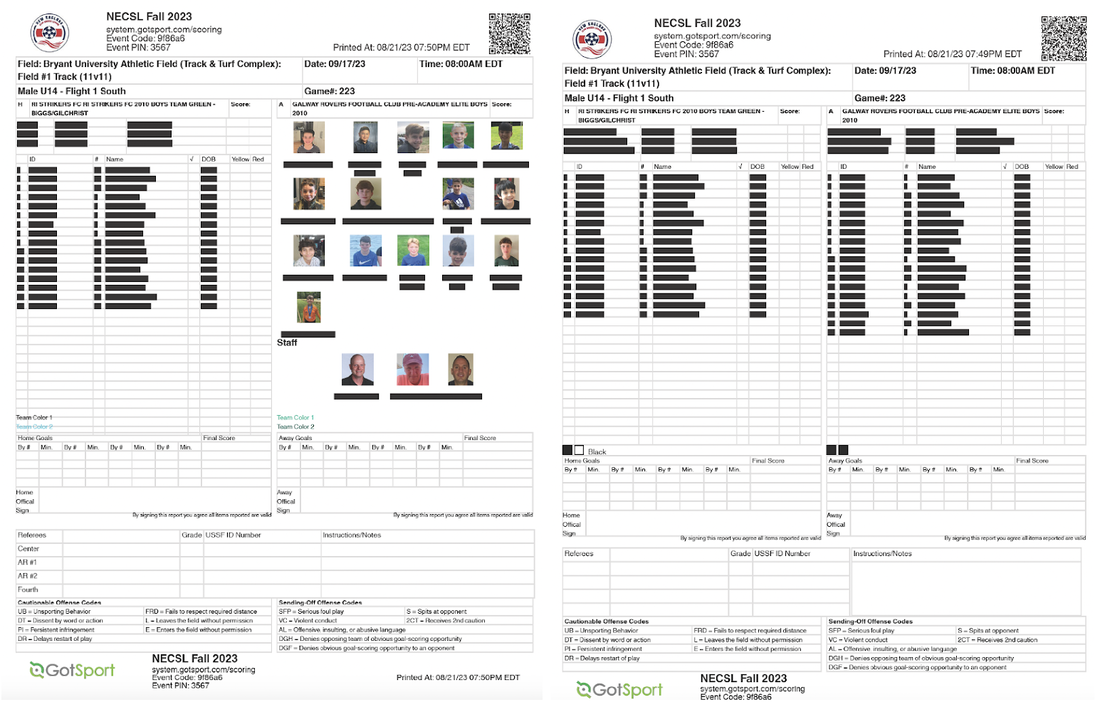
On a match day, a club needs to bring their Match Card (standard & photo, see examples below) for check-in purposes. Please find important links below on how to complete this process.
How to add/create a new player in Gotsport
How to assign a player to a team in Gotsport
Home & Away Team Rosters
Frequently Asked Questions
Question: Which team brings the Standard Match Card (one with both team's rosters)?
Question: Which team brings the Photo Match Card?
Question: Do we need to bring a photo match card/standard match card to the U9/U10 Festivals?
On a match day, a club needs to bring their Match Card (standard & photo, see examples below) for check-in purposes. Please find important links below on how to complete this process.
How to add/create a new player in Gotsport
How to assign a player to a team in Gotsport
Home & Away Team Rosters
- A Match Card for that specific game (Please input uniform #'s into Gotsport)
1 Standard Copy (coaches and referee sign this copy at the end of the game)
2 Photo Copies (1 for the referee to check-in players / 1 for the opponent) - Only players appearing on match card are eligible to participate in that match (No players can be written in)
- How to set a Match Day Roster & Add Club Pass Players
- How to print a Match Card
- Ensure that the referee completes the match card with the following information: goals (time and uniform #), final score, and any red or yellow cards listed next to the player's names (including the reason/code why the card was given.)
- Both coaches need to sign the match card, and the league recommends that the away team takes a picture of the Match Card
- The home team is responsible for uploading match card, inputting score, yellow/red cards into Gotsport.
- Match # and Pin # found on Match Card
- QR Code to go directly to that page in Gotsport also located on the Match Card
- Scoring Input Page if viewing from a desktop
- This must be completed in Gotsport within 72 hours of the final whistle.
Frequently Asked Questions
Question: Which team brings the Standard Match Card (one with both team's rosters)?
- Both teams: Based on when each team prints off their standard match card (one with both teams' rosters), these can be different.
- For example, if one team prints it off on Friday, and the other team makes changes to their roster and prints it off on Sunday, the match cards will be different.
- This is okay, and that is why we want both teams to bring standard match cards to the field.
- The most up-to-date one (either home or away) should be the one the ref completes at the end of the game and that the home team uploads to Gotsport.
- On the standard Match Card, it shows when the match card was printed (upper right-hand corner)
Question: Which team brings the Photo Match Card?
- Both teams: Your photo match card needs to match what is on the standard match card that YOU print out for YOUR team.
- Each player listed on photo match card needs to have their picture next to their name
- Bring two copies - one for the referee and one for the opponent
Question: Do we need to bring a photo match card/standard match card to the U9/U10 Festivals?
- Please bring just a Photo Match Card to these matches. This is good practice for managers/coaches, even if the college students don't check the teams in.
- The college students will not fill out the Standard Match Card, so there is no need to bring it.